AI damage scanners at car rental: how to protect yourself
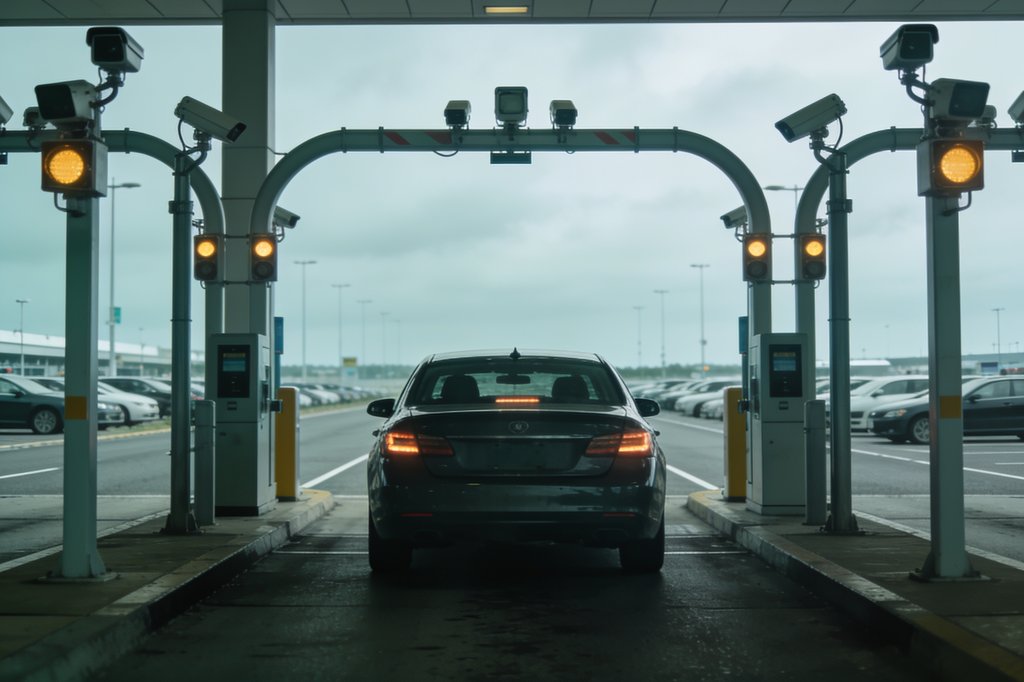
- Hertz and Sixt use drive-through scanners that photograph the car when it leaves and when it comes back, then flag differences as possible new damage.
- Disputes often start when damage that was already there was not flagged at pickup, or when there is no scan at pickup to compare against.
- Your own dated photos and video at both ends, plus the report you are given at return, are what let you answer a charge.
What these scanners are and how they work
Some rental companies now run cars through an arch of cameras, sensors and lights when they leave and re-enter the branch. Hertz calls its system Digital Vehicle Inspection, powered by UVeye. It scans the car as you exit and as you return, compares the two sets of images, and sends a post-rental inspection report if it finds damage and a cost.
Sixt calls its version Car Gate and uses it at select branches. It compares the return images with the pickup photos, but only if the pickup branch also has a Car Gate. Sixt says its staff review any suspected damage and that it opens a damage case only when the damage is clearly new.
The sources we read describe these systems mainly at large US airports, and a Sixt case at Manchester airport in the UK. Coverage varies by branch, so do not assume a scanner is, or is not, there.
Where disputes come from
The scanners take thousands of photos, so the problem is rarely a lack of images. The recurring complaints are about what happens next.
- Existing damage not flagged at pickup. A consumer ombudsman writing for The Points Guy says the errors she has seen come from the AI not alerting to damage the scanner did capture at pickup, then flagging it at return.
- No scan at pickup. One renter collected a car from a hotel, where there was no scanner, and was billed after driving through a scanner at return.
- Small or unclear findings. A consumer-protection expert says dirt or rain droplets on the car can be flagged as possible damage. Renters have received images with only orange boxes and no clear view of the damage.
- Fees on top of repair cost. Reported bills include $190 of administrative fees added to $160 for two dents, and a $1,500 Sixt bill that included depreciation, an appraiser fee and a $200 processing fee.
- Hard to reach a person. Hertz says renters can dispute by chat, email, phone or social media, but as of September 2025 not through its app.
At pickup: do not rely on the arch
Treat the scanner as the rental company's record, not yours. Before you leave the lot, walk around the car and film it in good light, close to each panel, wheels and rims, windscreen, roof and bumpers. Take photos of anything marked.
If you see damage nobody told you about, tell an employee and have it written down. The Points Guy ombudsman advises not to accept assurances that the scanner will record it or that it is too minor to matter. In her Manchester example, the renter photographed existing scrapes but did not report them at the desk, and it took months and an escalation to get the charge cancelled.
If the rental company gives you a damage sheet or pickup report, check it against what you see and ask for it by email. This is where a tool such as RentalProof fits: it adds server-verified time and GPS to your walkaround video and photos, seals them, and emails the report to you and the rental company before you drive away.
At return: wait for the report, then film again
Drive through the scanner, park, and film the car again in the return area, showing its position and the same panels as at pickup. Include a clear shot of the fuel gauge and odometer.
Do not leave until you have a return document. Sixt says its return receipt records the time, mileage, fuel level and any newly recorded damage, that it is not the final invoice, and that it is your primary proof if there is a discrepancy. Sixt also says staff can inspect the car with you, and you can sign the return report and have it emailed. A renter quoted by InvestigateTV advises not leaving until you get the scanner report, because afterwards there is little you can do.
Damage alerts can arrive fast, in one case about 17 minutes after drop-off, and in another two days later. Your return video taken at the lot is the only record of how the car looked when you handed it back.
If a charge arrives
Do not pay in a hurry and do not ignore it. Hertz invoices have offered a discount for paying immediately, which can push you to settle before you have checked anything.
Ask in writing for the full damage report with before and after images. The Points Guy ombudsman recommends requesting the Vehicle Incident Report, viewing it on a full-size screen, checking the photos are of your car and match your rental dates, and comparing them with your own photos. In the Manchester case, the rental company's own pickup scans showed the damage already there.
State the facts calmly: the rental dates, what your pickup photos show, and what you were given at return. If the first agent does not resolve it, ask for a human and then escalate. In the cases reported, bills were cancelled or closed only after media or ombudsman contact with company executives. We cannot promise any outcome, and the rules on damage charges differ by country and rental company.
What to keep, and for how long
Keep your pickup and return videos, photos, the rental agreement, the pickup damage sheet, the return receipt and every email. Keep them well beyond the end of the trip. The ombudsman reports a trend of rental companies sending repair bills months, even years, after a rental.
Sources
- 1What is SIXT Car Gate and how does it detect damage?SIXT · sixt.com
- 2What is Digital Vehicle Inspection (DVI) and how does it work?Hertz Support Hub · hertz.my.site.com
- 3An AI scanner falsely pinned $2,200 of rental car damage on meThe Points Guy · thepointsguy.com
- 4Rental car AI scanners flag alleged damage, leaving customers with surprise billsInvestigateTV · investigatetv.com
- 5Hertz deployed an AI vehicle scanner. Then came the CX meltdown.CX Dive · customerexperiencedive.com
- 6Hertz Says Its AI Catches Damages, JFK's Grandson Says It's Catching RentersCarscoops · carscoops.com
- 7Voitures de location: l'IA fait grimper les détections de dégâts… et les tensionsICTjournal · ictjournal.ch
Your feedback on RPA
Private, only the RPA team reads it.